Hopefully, you are spending time grooming your LinkedIn profile to be the best that it can be. After all, it very well may be the key to your online professional identity. It's quite possible you ran it through spell-check and have every i dotted and every t crossed. It's likely though that your profile URL is not memorable and looks like coding mumbo jumbo - a string ofunpronounceablerandom characters and numbers that laugh at anyone who tries to make sense of or remember them.
Please do your diligence some justice and use the thank you very much LinkedIn option to customize it for all eternity.
This comes smack out of the LinkedIn Premium Help Center a la Karla:
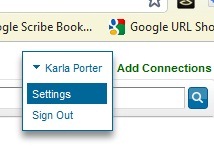
You can customize your public profile URL when youedit your public profilefrom theSettingspage. Custom public profile URLs are available on a first come, first served basis.
- Go toSettings.
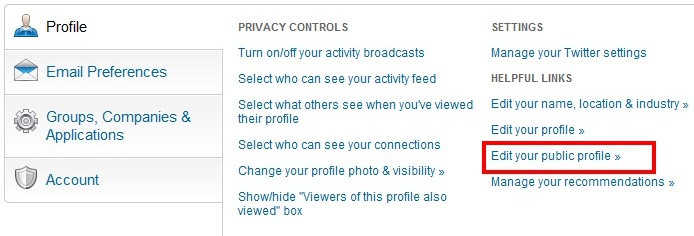
- Click "Edit your public profile".
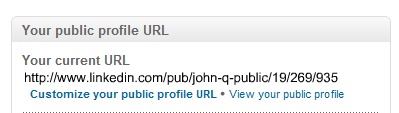
- In the "Your public profile URL" box on the right, click the "Customize your public profile URL" link.
- Type the last part of your new custom URL in the text box and click Set Custom URL.
It should be something beautiful like:http://www.linkedin.com/in/karlaporter
Voil now your profile URL is beautiful too!
Note: Your custom URL must contain between 5 - 30 letters or numbers (please do not use spaces, symbols, or special characters).
Leave a Reply